Thursday, 12 May 2011

The Film
This is the final version of our film. Overall, our group are extremely with the outcome, and look forward to hopefully making more films in the future. For me in particular, I have enjoyed directing the film, as well as editing it.
Friday, 1 April 2011
Magazine Article
Our magazine article looks extremely similar to a real, conventional one. Looking at these two images, (the first from the February 2011 Empire Magazine, and the second being our one), you can see how they are both similar:
We have both put yellow bars down the right by the film's roles; they both have a sentence enlarged in the centre which has been extracted from the article; the picture is in the top right of the page; the film's title overlaps part of the image; we both have verdict boxes, which also include rating stars.
Having our article looking like a real one makes it look better, and also more professional.


Thursday, 17 March 2011

Tuesday, 1 February 2011
Poster
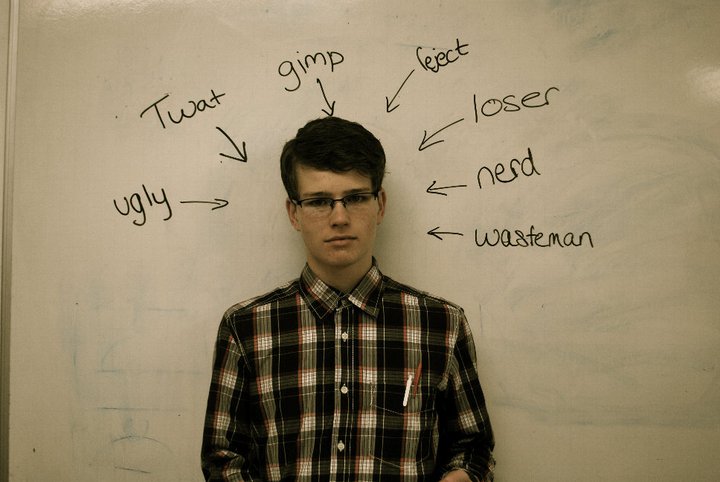
 Instead of typing out the title and other information of text on on our film poster, we decided to write it all up on the board, so that is was similar to the Dogme 95 rule. Dogme is amovement, set up by the Danish directors Lars von Trier and Thomas Vinterberg, whose goal is to instill a sense of simplicity into filmmaking. This was done by using hand-held cameras, an easy location, no music, no titles made on the computer, no lighting and no fancy costumes.
Here you can see the different stages of making our poster:
1) We first did a rough version of what the poster would look like

2) We then shot a photo of Ryan standing in front of the whiteboard, with draft words around him
 3) Using photo shop, we cut around Ryan's body so that he could be put onto another/different background

4) This is a second version of our poster. It was made using Photoshop, and apply texts onto the picture.

5) Instead, we decided to write everything onto the whiteboard.
 6) This meant that we could then place the cut out Ryan onto the new background, and our poster would be complete.

Friday, 21 January 2011
Magazine Article
We made our magazine article by using Adobe InDesign. We were able to add screenshots from our film, type our own text, and arrange it to how a professional magazine would look.

Thursday, 20 January 2011
Friday, 7 January 2011
Audience Feedback
We asked a variety of people to give feedback of our film. Their ages vary from 17 - 27, and within the group there are 3 males and 3 females.
Claudia Humphreys, 17
"The film was very entertaining to watch, and it is a film that most teenagers would go to see, because they would be able to associate themselves with the characters and the events that occur in the film."
Petros Poyiatgi, 17
"I like this film because one of my favourite genres is Teen Drama, which I believe this film fits in nicely. The only criticism I have for it is that one of the scenes (after the two boys hear what the girls says about her ideal man) I thought isn't needed or should be changed to make more obvious to the audience. Other than that, I really enjoyed it and would think it would make a fun feature film."
Ed Bullock, 18
"The film follows the conventions of the genre and the mise en scene is fitting to the style to other romantic comedies. The use of editing techniques makes the narrative easy to follow."
Nini Hadjipateras, 17
"The setting of the film, in the school and in friends rooms, really emphasises the conventions of a young, romantic comedy. The editing technique used in the outfits scene is entertaining and the music helps create a climax for the final look."
Charley Lebetkin, 17
"This film follows the conventions of the romantic comedy genre. The editing of this film made is extremely easy to follows the story line. I enjoyed watching the outfits scenes and I thoroughly enjoyed watching the whole film."
George Butterworth, 27
"I enjoyed the film immensely; the comedic scenes work very well, although the dialogue is a little too quiet. The costumes are great, the story moves along at a nice pace, but unfortunately some of the actors rush through their lines a bit which makes it a little confusing in places."
Tuesday, 21 December 2010
Trailer
I made this trailer using iMovie. This will go on our DVD Extras, and is a preview to the final, finished version of our film.
The trailer follows the conventions of a real movie trailer, by using music that fits in with our drama, titles, different shot lengths, shot sizes, a release date, the actors names, the directors, and also the roles of everyone else in the film's production.
http://www.youtube.com/watch?v=DwLGxNLo55s


Another convention with this trailer is that we created our own distributor, 'Fine Art Films', parodying Paramount Pictures,
Sunday, 28 November 2010
Poster Idea 2
As well as the smiley face idea, we also thought that we could have just the one main character, with words written on the board. As well as these describing words shown, there would also be the name of the film and the films director, producer and actors.
Below is a rough preview.

Below is a rough preview.
Thursday, 18 November 2010
Pre-Production Video
For our group, we made a video of Gabbie and Didi talking about the different sheets we have produced, such as the production schedule, characters and their costumes, and we also filmed them talking about the location of the courtyard, classrooms and corridor. I edited the short clip on iMovie, then uploaded it onto my Youtube account. Using iMovie, I was able to add different titles, transitions, and other effects to our clip. As well as the locations and the printed sheets, I also added the music. One of the pieces of music that was put in was composed by Max, and will be used for Charlie's imagination scene, for when he imagins himself leaning in for a kiss with Gabriella. I also added the music which we might use for our montage scene. I have added both songs, so everyone can see which one is better, and which song would fit that part of the film. The music for that part was done by the artist, Shaheen. As well as Max and Shaheen's music, I also added the songs which our group might use for the second last scene, when we see Max preparing Charlie to go up to Gabriella, and Charlie is acting all cool, as well as dressing a bit more cool, unlike his geek outfit. The songs which go into consideration for this scene are by UnkleJam.
This is short clip that I edited and filmed, which shows all of our pre-production: (To view it bigger, click on the button on the bottom right)
These are the screen shots for when I was editing the short clip in iMovie:
All:
- This screenshot shows all of the iMovie application. You can see the video files at the bottom, and everything around it.

Selected Parts:
- Here, you can see which part of the video file I have used in the video. Where it has an orange line at the bottom, that shows it has been selected, and where there is no orange line, that shot has not been used.

Titles:
- This screenshot shows the options for selecting the titles. In iMovie, there are around 20 titles that you can change and edit.

Editing Titles:
- Once you have selected the title you want, you can then edit the size, colour, font and boldness etc.

Transitions:
- Similarly to the titles, you can choose from a range of pre-loaded transitions.

Music:
- When editing the short documentary style clip, I was able to add different songs and music. I created my own playlist in iTunes called 'Smile' which consists of all of the songs we might use in our 5 minute film. You can then drag it into your iMovie 'Project' so it fits in with a piece of video.

Sound Editing:
- Once you have put the music in place, you can change the volume of each of the different sound tracks. For example, in this video, I had to raise the volume of the dialogue because compared to the music, it was not that loud.

Music for imagination scene
Max created the music for Charlie's imagination scene, using Logic Pro. Max and Ryan had the idea that they wanted it to sound similar to Marvin Gaye's 'Sexual Healing'. It started of calm and mellow, but with a big climax half way through. The song consists of a total of 19 tracks, and instruments which include: harps, violins, pianos, horns, cellos and many more. Max added effects such as reverb, delay and and he edited the panning, EQ and velocity of each track. Max also dived deep into synthesis, editing the ADSR and envelopes. To create the soul feel drum kit, he used Ultrabeat, which is a drum beat sampler, making the kick and snare drum very soft with the high hats and symbols very crisp.
This is the full song:
Here are some screen shots of everything that has been explained above:
Full Screen:

Piano Roll:

Mixer:

Ultrabeat:

Instruments Used:

This is the full song:
Here are some screen shots of everything that has been explained above:
Full Screen:

Piano Roll:

Mixer:

Ultrabeat:

Instruments Used:

Thursday, 11 November 2010
Location
This is the location we are using for our 5 minute film. The bench (in the photo) is the bench that Charlie and Max will have there lunch on, and the other bench is where Gabriella and Sophie will be sitting, outside the classroom. The corridor is where Charlie will walk through, towards Gabriella when he leans in for his imaginary kiss.


Thursday, 4 November 2010
Film Poster Ideas
Between our group members we discussed ideas in how to create our poster. We came up with many different ideas that we couldn't agree on so we decided on mixing them together and came up with something we were all really liked.
Here is a sketch of our poster.

Background: White (Yellow Border)
Writing: Yellow (Black Outline)
The character at the top left is Gabriella and top right is Max. Both their bodies we plan to fade into the background. The character in the middle is Charlie. We plan to split him in half and fade it together to show his geek side (on the right) and to show his cool side (on the left).
We then had the title at the bottom in a curve, curving upwards.
We have placed all the characters and wording in particular places to create a smiley face. i.e. Max and Gabriella's heads being eyes, Charlie's being a nose, and Smile being the smiley mouth. It is similar to the image below.

Here are some examples of some famous Romantic Comedy posters. You can spot the similarity between them all. They all have white backgrounds, bold writing and a bright happy vibe to them.

Sunday, 24 October 2010
Soundtrack
As well as Max doing some of the soundtrack, our group have managed to get copyright from two recording artists, Shaheen who was in the final of Britain's Got Talent, and a soul/funk group, UnkleJam. The songs from these artist's might be used in our montage sequence, but we are not yet sure on which one we are going to use.
Saturday, 23 October 2010

Friday, 22 October 2010

Prop/Sounds
1 - Ext. - Cycling to college
Sound FX of bicycle
Whistling "Lucky - Kylie Minogue"
Pink bicycle
2A - Int. - Classroom
Classroom Sounds
Pencil Case, Text Books
2B - Ext. - Outside classroom
Romantic music
Blackberry (Gabriella)
Starbucks Coffee (Gabriella/Sophie)
2A - Int. - Classroom
3 - Int. - Outside classrom
Common Room Sounds
Pen, paper
Blackberry's
Coffee
Half eaten muffin
4 - Ext.- Sitting in courtyard eating lunch
Tuppa Wear Lunch Box
Picnic Chocolate Bar
Carrot Sticks
5 - Int./Ext. - Montage
Music - Shaheen (Mircales/Hip Teens) or UnkleJam
Clothes , hats , shirts etc
6A - Ext. - Round the corner from school
New look props e.g Rocky
Blackberry, Watch
P. Diddy - Bad Boys
6B - Ext. - Outside classroom
Blackberry, watch, sunglasses
8 - Ext. - Charlie is inside class, Gabriella is outside
Text Books
Lunch box , Pencil Case


Subscribe to:
Posts (Atom)